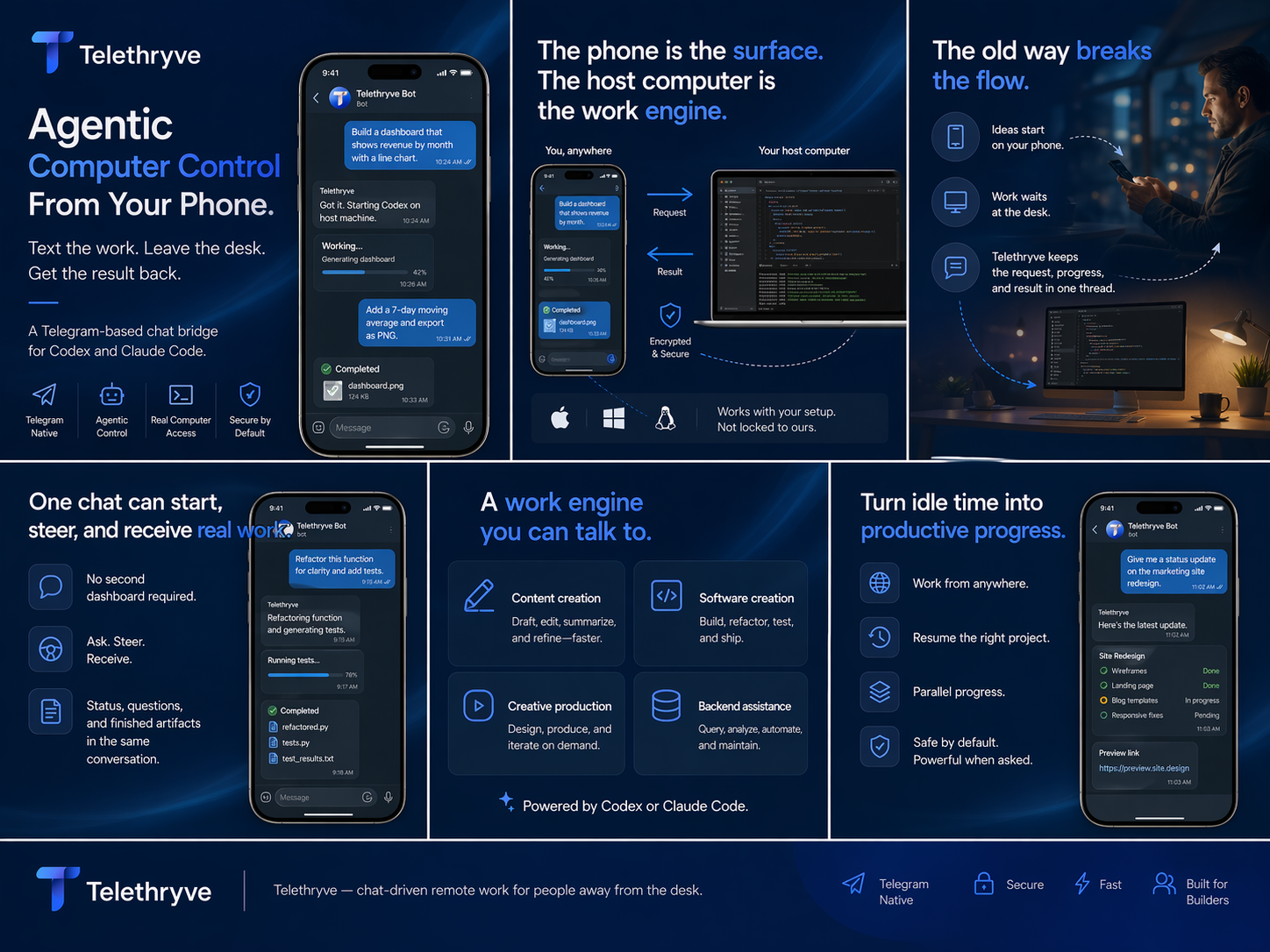
Send from mobile
Use the Telethryve iOS or Android app, or Telegram, to describe the task in normal language.
Local LLM Workstation
Telethryve connects iOS, Android, or Telegram to local LLM and agent workflows on your workstation, where your model, files, tools, compute, and project context can work together.
Built for the AI PC era
Local LLMs can use the compute a customer already owns while keeping sensitive context close to the working environment. Telethryve makes that capability reachable without turning the phone into a remote desktop.
How local work moves
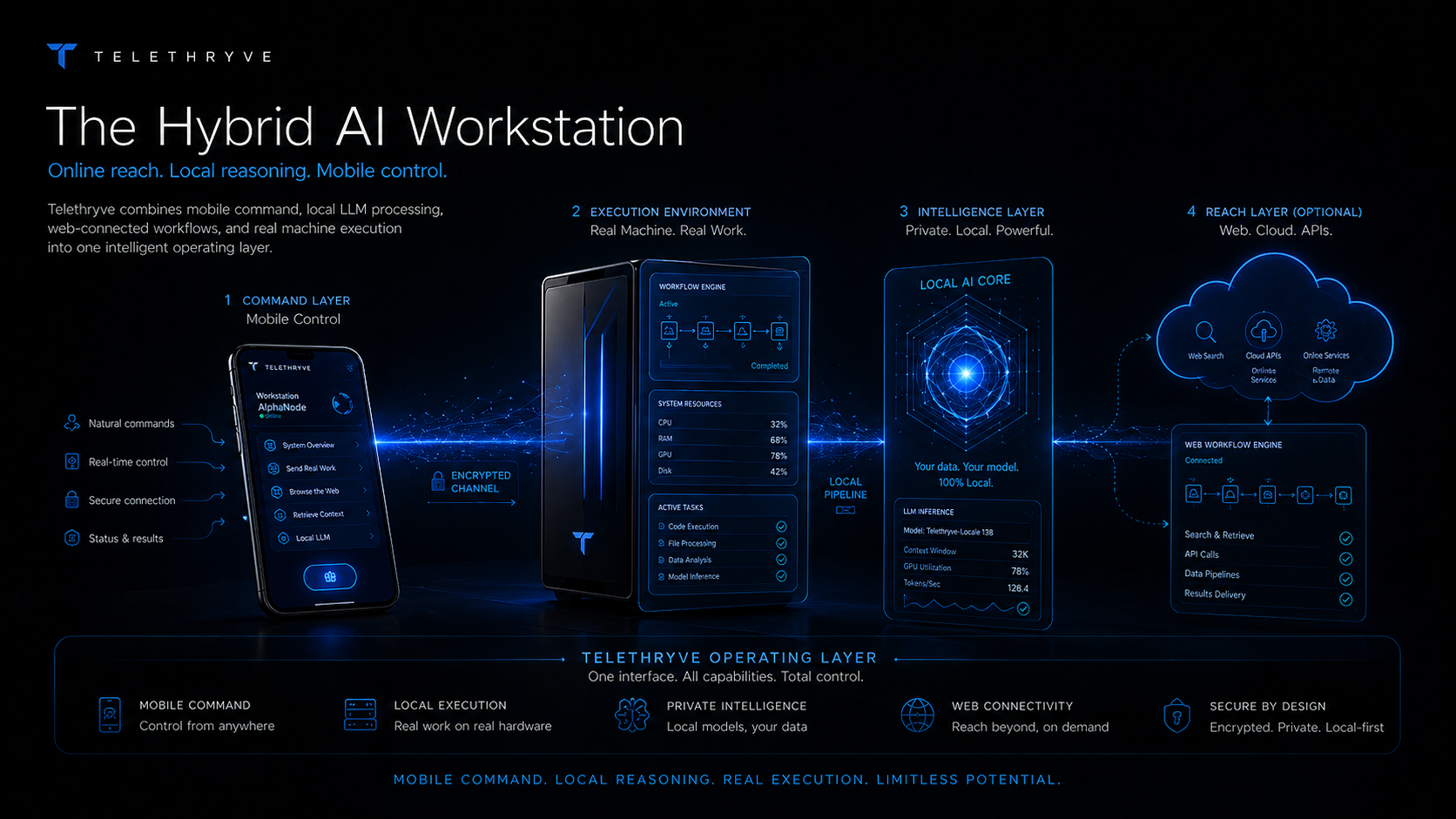
Telethryve does not move your workstation into the cloud. It routes a mobile instruction into the local environment you selected, then brings status and output back.
Use the Telethryve iOS or Android app, or Telegram, to describe the task in normal language.
The paired Telethryve Desktop bridge selects the project and profile configured for that work.
A compatible local LLM, agent, files, retrieval context, and tools run together on your hardware.
Questions, status, artifacts, and completed output come back to the mobile conversation.
Why Telethryve
Telethryve supplies the mobile command loop around the local intelligence you configure. Your workstation remains the place where context, compute, tools, and execution come together.
Point a compatible profile at a local model when sensitive context, offline access, or machine-local reasoning matters.
Let repositories, documents, notes, retrieval memory, browser state, and local tools remain beside the model.
Start work, watch progress, answer questions, and receive artifacts from the same mobile conversation.
Local, hybrid, or hosted
Profiles make the intelligence path explicit instead of forcing every task through the same provider.
Keep compatible model inference, project context, and tool execution on the workstation.
Use local processing for private context while allowing selected connected services when needed.
Use a hosted model such as Claude while the workstation still supplies local project files, apps, and execution.
Use Case
Local LLMs can use the compute a customer already owns while keeping sensitive context close to the working environment. Telethryve makes that capability reachable without turning the phone into a remote desktop.
The product supplies secure pairing, mobile message routing, project and profile selection, status, follow-up questions, and returned results around the configured workstation runtime.
Private document work, local coding, research, creative production, operational workflows, AI PC experimentation, and teams that want a clear alternative to cloud-only processing.
FAQ
No. Telethryve is the command and routing layer. You choose and configure the compatible local model, runtime, and hardware on the workstation.
With a compatible local profile, model inference, project files, retrieval context, and tool execution can stay on the workstation. Optional mobile access uses a relay to carry commands and results; see /apps/ for current availability and terms.
Yes. Profiles can represent local, hybrid, or hosted paths. For example, Claude Code can use local project context on the workstation while its model remains hosted by Anthropic.
No. Local reasoning can support documents, private notes, research, creative production, operations, and repeatable business workflows as well as code.
Related Workflows
Telethryve turns a phone into the command surface for a real local AI workstation, so files, tools, browsers, code, local models, compute, and results stay connected to your own machine.
Telethryve can support optional air-gapped workstation workflows when the customer's own setup keeps local LLM reasoning, memory, retrieval, files, and tool execution without cloud dependence.
Telethryve Desktop is a $19.99 one-time purchase for Codex-style work on the workstation where repositories, files, tools, and project context already live. Optional mobile access is described on the Apps page.
Telethryve connects agentic AI workflows to the host workstation so tasks can use files, tools, browsers, code, local memory, and real project context.
Telethryve gives remote AI workstation searches a practical answer: send the instruction from a phone while the real computer keeps the files, tools, projects, models, and outputs.
Telethryve helps people who start with ChatGPT-style mobile prompts turn ideas into workstation tasks that can use local files, tools, agents, and project context.
Telethryve Desktop is a $19.99 one-time purchase for Codex-style work where the workstation keeps the repository, terminal, tools, and tests. Optional iPhone access depends on current availability and terms.
Telethryve positions a Mac mini, desktop, or always-on workstation as the place where mobile AI requests can use local files, local models, tools, and agent workflows.
Telethryve Desktop supports Codex-style project work on the workstation. Optional mobile access can help a phone request become agentic coding, review, docs, tests, or release chores; see /apps/ for availability and terms.
Telethryve helps founders turn phone moments into real workstation tasks for product, code, content, research, launch, support, and operating workflows.
Download Telethryve, watch the product story, and see how Desktop connects configured AI to a user's own computer, agents, coding apps, and local AI workflows. Mobile access is optional.
Next Step
Start with Telethryve Desktop for $19.99 once, then connect the local, hybrid, or hosted profiles your work requires. Mobile access is optional; see /apps/ for current availability and terms.